Which SLR? 500D vs D5000 vs E620 vs GH1 vs K-x

The arrival of the Pentax K-x is really exciting news and if I'm going to get an SLR, which one will I get?

Canon EOS 500D Nikon D5000 Olympus E620 Panasonic GH1 Pentax K-x
Sensor Size 22.3 x 14.9 mm
3.32 cm²
23.6 x 15.8 mm
3.72 cm²
18.0 x 13.5 mm
2.43 cm²
18.0 x 13.5 mm
2.43 cm²
23.6 x 15.8 mm
3.72 cm²
Pixels 15.1 million 12.3 million 12.3 million 12.1 million 12.4 million
Pixel Density 4.5 MP/cm² 3.3 MP/cm² 5.1 MP/cm² 5 MP/cm² 3.3 MP/cm²
Pentax K-x has the best pixel density which translates to excellent image quality and great low light performance. The Nikon has the same low pixel density, but lose out on low light, based on reviews.
ISO 100-3200,
(6400-12800)
200-3200,
(6400)
100-3200

100-1600,
(3200)
200-6400,
(100-12800)
Pretty even for all cameras. If a camera lets you take ISO12800 photos, it does not mean that it's usable or clean (noiseless).
Image stabilization No No Yes, Sensor shift Yes, LensYes, Sensor shift
Canon and Nikon does not have image stabilization (IS) built into the camera, which means that you have to buy lenses that have IS, thus generally more expensive lenses.
Auto Focus 9-point
phase detect
11 point
phase detect
7-point
phase detect
Contrast
detect
11 point
phase detect
Min shutter 30 sec 30 sec 60 sec 60 sec 30 sec
Max shutter 1/4000 sec 1/4000 sec 1/4000 sec 1/4000 sec 1/6000 sec
Pentax K-x has an extremely fast shutter at 1/6000s meaning you'd probably be able to shoot fast actions.
Flash range 13 m 17 m 12 m 10.5 m 16 m
Exposure compensation ±2EV
0.3/0.5 steps
±5EV
0.3/0.5 steps
±5EV
0.3 steps
±3EV
0.3 steps
±3 EV
0.3/0.5 steps
Canon has only ±2EV compensation, not as good as the rest which has wider exposure compensation, especially useful when you want to capture multiple exposures for High Dynamic Range (HDR) photos.
Metering 35 Area Eval, Center-weighted, Partial, spot 3D Matrix meter II, Center-weighted, Spot ESP multi-pattern, Center-weighted, Spot Multi-segment, Center-weighted, Spot 16-segment Multi, Center-weighted, Spot
Continuous Drive 3.4 fps 4 fps 4 fps 3 or 2 fps 4.7 or 2 fps
Movie Clips 1920 x 1080 20fps
1280 x 720 30fps
640 x 480 30fps
1280 x 720 24fps
640 x 424 24fps
320 x 216 24fps
No 1920 x 1080 24fps
1280 x 720 60fps
848 x 480 30fps
640 x 480 30fps
320 x 240 30fps
1280 x 720 24fps
640 x 416 24fps
The inability of the Olympus E620 capture video is a deal killer. While Canon and Panasonic can produce full 1080 HD videos, the rest can capture 720 HD which is sufficient for me.
Uncompressed format RAW RAW RAW RAW RAW (PEF / DNG)
LCD 3 " 2.7 " 2.7 " 3 " 2.7 "
A larger LCD screen is always preferable, but 2.7" is not a deal breaker either.
LCD Resolution 920,000 230,000 230,000 460,000 230,000
Canon wins hands down with it's high resolution screen. Will it be enough to convince me to buy a Canon? We'll see.
LCD Type Fixed Tilt & Swivel Tilt & Swivel Tilt & Swivel Fixed
The ability to tilt and swivel your screen is definitely helpful, but bear in mind that these are SLR cameras, and except for the Panasonic GH1, live view is pretty slow, so you'll be looking through the viewfinder most of the time.
Live View Yes Yes Yes Yes Yes
HDMI Yes Yes No Yes No
Battery Lithium-Ion rechargeable Lithium-Ion rechargeable Lithium-Ion rechargeable Lithium-Ion rechargeable AA (4) batteries
There have been reports that the Pentax K-z are eating batteries for breakfast and sooner rather than later you're going to get rechargable batteries for it. Good Rechargable AA batteries don't come cheap, and it requires a good slow charger to maximize power and battery life.
Weight
(inc. batteries)
520 g 590 g 500 g 385 g 580 g
Dimensions 129 x 98 x 62 mm 127 x 104 x 80 mm 130 x 94 x 60 mm 124 x 90 x 45 mm 123 x 92 x 68 mm
The Pentax K-x have the smallest dimension and is my favourite.
Review Links Full Review Full Review Full Review Full Review Full Review

All of them are good cameras but how much do they sell for?

Canon EOS 500D Nikon D5000 Olympus E620 Panasonic GH1 Pentax K-x
Price Kit Lens $759.95
18-55mm F3.5-5.6
(29-88mm)
$649.99
18-55mm F3.5-5.6
(27-83mm)
$549.00
14-42mm F3.5-5.6
(28-84mm)
$1299.95
14-140mm F4-5.8
(28-280mm)
$549.95
18-55mm F3.5-5.6
(27-83mm)
The Olympus E620 is out of the question as it does not capture movies. The Panasonic is way too expensive for me. This leave me with the Canon, Nikon and Pentax. On paper, the Pentax wins in specifications and has received great reviews. It's the best performer in it's class at low light and still new (as of this writing), so the price is expected to drop further. If I were to consider nothing else, it'll be the camera I'll buy.
Twin Kit Lens $899.98
55-250mm F4-5.6
(29-400mm 13.8x)
$846.95
55-200mm F4-5.6
(27-300mm 11.1x)
$649.00
40-150mm F4-5.6
(28-300mm 10.7x)
$1299.95
14-140mm F4-5.8
(28-280mm 10x)
$749.00
55-300mm F4-5.8
(27-450mm 16.7x)
Because I own a Panasonic FZ28 now with it's 27-486mm (35mm) lens, I would definitely like to have more or less the same zoom when I get a SLR. Nowadays, many SLR kits comes with twin lens, but the Pentax K-x wins hands down with it's zoom (16.7x) and it's unbeatable price. Again, if I would consider nothing else, it'll be the camera I'll buy.
Prime Lens $479.95
Canon 28mm F1.8
(44.8mm)
$199.95
Nikon 35mm F1.8
(52.5mm)
$199.95
Zuiko 25mm F2.8
(50mm)
$399.00
Lumix 20mm F1.7
(40mm)
$439.00
Sigma 30mm F1.4
(45mm)
To get a feel of lenses that I may want to buy later on, I've also listed a fast prime lens that's good for portraits and indoor shooting. Here the Nikon wins hands down with it's low cost yet excellent quality prime lens.

If you're already a SLR owner, it make sense to buy a camera from the same manufacturer, so that you'll still be able to use your older lenses. But I don't, so I'm not tied to any manufacturer. For this reason, it makes sense for me to research a manufacturer more, so that once I'm tied to them, I will not regret getting tied.

The story with Pentax is that they are one of the world's largest optical companies, and made the first Japanese 35mm SLR. I'm guessing that when everyone switched from film to digital, like Konica-Minolta (bought over by Sony) it's facing great difficulties in competing because of it's inability to produce a digital sensor internally. All this is past, as Pentax has been working with Samsung from 2005 to recapture market ground from Nikon and Canon. As of March 2008, it merged into Hoya and is now a division of Hoya. (Full story at wikipedia).

The thing is, I don't want to be tied to a manufacturer and later on, wanting to buy extra lenses, find that they don't exist or are too expensive to afford. Therefore, I dig deep into eBay (where cheap lenses are to be had) to find out more about lens availability and pricing.

eBay Statistics Canon EOS 500D Nikon D5000 Olympus E620 Panasonic GH1 Pentax K-x
Lens available 5385 5349 1719 1272 2300
Avg. Price, Units
(last 30 days as
of 29 Dec 2009)
Fisheye $74.34, 1208 $90.85, 986 $80.56, 59 $56.51, 56 $173.49, 74
Macro $108.49, 1919 $98.41, 1368 $116.00, 157 $176.49, 29 $124.82, 255
Prime $172.87, 108 $146.83, 108 $158.40, 23 $849.00, 1 $74.70, 89
Telephoto $292.23, 1199 $156.52, 524 $79.28, 99 $56.15, 58 $200.23, 94
Wide Angle $152.69, 1357 $84.30, 882 $63.26, 134 $58.31, 131 $102.8, 114
Zoom $240.23, 2312 $307.11, 1607 $173.06, 223 $265.10, 45 $93.31, 359

Because Canon and Nikon are the top 2 camera brands worldwide, they have the most lenses on sale at eBay (5385 & 5349 respectively, they fluctuate but is accurate the the time of this writing). Please bear in mind that this is not an objective nor scientific study, I just clicked on the lenses category in eBay and filter for SLR lenses. Using other tools, I was able to obtain average prices and units sold for different lenses using keyword search (e.g. canon fisheye lens). The data is tabulated on the table as shown above.

Based on the specifications, reviews and prices, I was ready to purchase a Pentax K-x, but when I dig into eBay data, it's clear that Canon and Nikon has more lenses available, with Nikon generally more affordable. The thing is, Pentax may be cheaper initially, but if you're going to build up your lens collection, you're gonna have less choice and may end up with less money.

Now I'm just torn between the Pentax and the Nikon. Guessed I've narrowed it down and it'll have to boil down to how I feel when I hold the camera in my hands if I get a chance. Plus, there's the matter of getting a purchasing license from the Mrs., but that'll be another long post.
Why I dumped my Photo Manager for Picasa.

My sister got married recently and we shot an enormous amount of photos, not including 720p videos. Naturally some guest were requesting photos and it's impossible to send it to them without some sort of sorting and organization. And for this reason, I downloaded and installed Picasa.

1. Tag People Easily Through Face Detection & Recognition

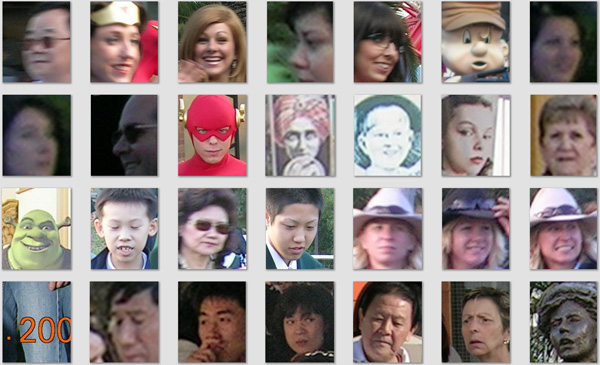
Once installed, Picasa will search your folders for images and try to detect faces in those photos, and boy, did it do this well. So well , in fact that it ask me to label faces below:

Bear in mind that Picasa only detects faces, it's up to you to identify them, or type in their name. Once you've told Picasa that the green guy is Shrek, it'll be able to recognize that most green guys are Shrek and suggest it to you, where you just click yes or no to identify the face without further typing. The software's also smart enough to group similar faces together, so that you get to identify a bunch of them in a single action. People's faces changes over time, and if you have old photos, all you gotta do is to identify one, and Picasa will recognize and suggest the rest.

For the ability to detect and recognize faces alone, Picasa is definitely worth the (free) download.

2. Organize Photos into Multiple Albums

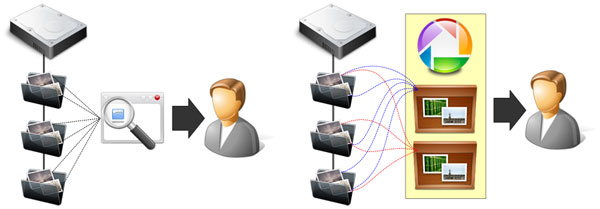
I have always organized my photos into folders. I have a main folder (Lumix) and under it I have "Occasions" or "Flowers". I also have a folder called "Incoming" where I download all my photos from my camera before I process them a bit and sort them out into different folders. When I view them using my photo viewer or manager, I see my photos through my folder structure, illustrated below on the left.

Left: Normal photo viewing through folder structure. Right: Viewing your photos through albums in Picasa.

On the right, you will see that Picasa allows you to view things differently through albums. For example, I have a photo of a flower (AusFlower.jpg) which I took in Australia and it resides in the folder "Flowers". If I create "Australia Album" and "Flowers Album", I can tell Picasa to put AusFlower.jpg in both albums, so that the same photo appears in both albums, despite the fact that only one copy of the photo exist physically on my "Flowers" folder.

While Picasa still allows you to view photos through the folder structure, albums lets you view and organize your photos with much greater flexibility. It also allows me to create 'temporary' albums, so that I could add in all the photos I wanted to send to a guest, zip them up and then delete the album, without physically deleting my photos on my hard drive. Now that's powerful.

3. Arrange and Sort Photos The Way I Wanted

The FZ28 always name our photos, PXXXXXXX.jpg. When you have a friend who uses a Canon send you photos, they are named IMG_XXXX.jpg. When you drop all these photos into a folder, all IMG_XXXX photos will be displayed before all your PXXXXXXX are displayed, because they are sorted alphabetically. For my sister's wedding, I wanted to preserve a timeline, meaning I wanted all photos that's taken at the same time to appear together (they have the same date), irrespective their file names.

Fortunately Picasa allows you to drag and drop photos to arrange them, without the need to modify or rename them physically on the hard drive. Picasa keeps tracks of how you wanted your photo arranged in a database, and everytime you fire up Picasa, they will be arranged as you have always wanted. Super!

4. Modify Photos without Actually Modifying Them

Sometimes I take a photo of a flower but it's obvious that some cropping will improve the photo. If I crop the photo, I will lose the original unless I save a copy of the original. With Picasa, all these is unneccassary as Picasa allows you to do virtual editing and cropping without actually modifying the photo on your hard drive.

Photo as it is captured by camera Same photo cropped in Picasa

Once you crop your photo, it will appear cropped in Picasa but the original photo on your hard drive remains untouched. You can undo your editing and cropping at any time in Picasa to go back to your original. Now this is how photo post production should be.

Photo as it is captured by camera Same photo with post processing

Other than cropping there are other effects in Picasa as shown above that you can play with, all of them undoable, meaning you can go back to your original at any time.

5. Search My Photos Easily

If you are not aware by now, Picasa is a free download from Google. And Google is famous for search. In Picasa, type in ".rw2" and picasa will show you all your photos on your hard drive with raw format. Type in a person's name and Picasa will show you all photos in which a person appears in. All these in almost real time speed. What's more to say?

Conclusion

In fact there a lots more features and benefits for Picasa, I just listed the "killer" features for me. I'm sold, you should give it a try.

The Color Yellow.

Sometimes I don't know why I like a particular shot. I can't explain it but the attraction is unmistakable.

Sometimes a simple flower by the road side teaches me about many things, surviving and thriving despite the conditions, how to frame shots, and how the FZ28 captures superb details.

Same flower shot, shown at about 33.3%.

Most of the times, I'm just amazed at the flower shots I get with my FZ28, especially the one showing as much details as below:

Same flower shot, shown at 100%.

Moon Cake Festival.

No, it's not Halloween, and it's not a pumpkin. It's actually a Pomelo and every year, we make one like this because it's fun. I live right beside where they grow the most famous pomelo in Malaysia.

Exploring Fake Tilt Shift.

Went up a mountain on a hazy day and took this:

Everything was whitish and thought of tilt-shift to maybe salvage the photo. Went to TiltShiftMaker.com, uploaded my photo, adjusted a couple of things and voila:

It may not be a extremely suitable photo for tilt shift effects but it's a start. Perhaps more to come later.

Moon Shots with the FZ28.

Before I bought the FZ28, I was amazed at the moon shots taken by other users on Flickr, so when I got the opportunity, I shot away.

Moon shot, f5.6, 1/250 s, ISO100, cropped, slightly resized to smaller (about 100 pixels).

So how did I shoot mine?

  • I used Program mode (P or Program Auto Exposure).

    I've read that you should use manual mode and f8.0 but when I was holding the camera and preparing to shoot, I forgot all about what I've read, so I asked the camera to decide the best aperture and shutter speed for me. Turns out the camera did a fine job.

  • I set the Metering Mode to Spot Metering.

    The normal metering mode on the FZ28 is multi area metering, but even if you set the metering to center weighted, and then point the camera at the moon, it'll appear as a white blob of light without details. Setting the camera to Spot Metering basically tells the camera to make sure the subject you're pointing to is properly lighted. On the FZ28, you could even move this metering spot to anywhere on your frame by pressing the AF/Focus button and then moving the metering cross hair with the joystick.

  • I did NOT use a tripod and I set Image Stabilizer to Auto.

    I did use a tripod initially but because my tripod was an el-cheapo, it drooped immediately after I tightened it, so I was having a hard time pointing my camera to the moon. Of course, I turned off Stabilizer when using a tripod because I've read somewhere that if you don't turn it off when using a tripod, the image will be blurred.

    Then I noticed that the moon was actually pretty bright and the camera is using a shutter speed of 1/250s or 1/200s. I thought I would not have problems holding the camera still at this speed and proceeded to set Stabilizer to Auto and hand held the camera.

    Initially I slipped the neck strap under my arm and then pushed out my camera fully so that the strap is taut between me and the camera, and this helps to stabilize the camera but later I found that placing my arms on a table or on my car also helps me keep it stable.

  • I set to 3 Megapixel and use Extra Optical Zoom (EZ) at maximum 32.1x.

    Originally I thought that the EZ zoom is nothing but a crop of the frame to get a smaller image, and thus more zoom, which amounted to nothing since I could do the same with software and crop images myself. But then I found out that EZ zoom is much more than a simple crop and may include exposure and other stuffs in the camera. I'm going to crop the moon shot anyway, so I let the camera do the job for me.

  • I did not use any sharpening nor noise reduction.

    I tried a couple of shots by playing around with Picture Adjust Settings on the camera where I could adjust Contrast, Sharpening, Saturation and Noise Reduction but did not like the effects.

  • Interesting facts about the moon.

    The moon is 384,403 km away from earth and because it's rotation about it's own axis takes about the same amount of time for it's orbit around earth, we only see the same face of the moon all the time, called the near side (the other side is called the far side, sometimes the dark side). Temperatures during the lunar day averages 107°C (beyond boiling hot) while at night it averages -153°C. The moon is said to be the most photographed object ever.

It could still be improved upon but for that I'll need help from commenters. Thanks for looking.

Strange Behaviours for RAW Processors?

It was late afternoon and the sun was about to set, but still I whipped out my Circular Polarizing Filter (CPL) to try to get the sky a little more blue, so I zoomed full wide and shot the below. When I first saw the photo on the PC it was rather OK, but when I tried to process it using ACDSee RAW processor, I was surprised to see mechanical lens vignetting (dark around the four corners of the photo). It turns out that the different processor will interpret .RW2 data differently and produces different results.

The SilkyPix RAW processor somehow reduces lens vignetting through software and actually produces very little lens vignetting. It also gives very natural colors, more bluer skies.

The cons is that it's not the easiest to use piece of software.

Note: The supplied PhotoFunStudio viewer, despite inability to process raw files, still manage to render the photo close to what you'll see in SilkyPix.

ACDSee RAW processor simply produces much more vignetting. The whole photo is also a little brighter.

Adobe DNG converter first converts .RW2 files into .DNG file which amounts to about 3 times the size of the .RW2 file. Since a .RW2 file is about 12MB, the .DNG file is about 36MB.

The results produced very little vignetting but slightly washed out colors, with the whole photo brighter on the whole.

After comparing all 3 photos, which raw processor will I use?

  • I will avoid the Adobe DNG route since it involves creating another huge file without major benefits.
  • I will always have a look at all raw photo using PhotoFunStudio and only when necessary, use SilkyPix.
  • If ACDRaw is not giving me problems, I'll stick with it since it's the easiest to use.