Working Hard.

Red Hibiscus with ants. 80.4mm (452mm), 1/125s, F4.0, ISO125, cropped & auto tuned in Picasa.

I like to take walks. Where I am, the sun sets at 7.15pm, so my walks usually start one hour before, that's when I find the time to do it. I meet with strangers often, and most of the time they are usually walking their dogs. I would say hello normally, unless I'm occupied with my camera. I met this old man a couple of times, and yesterday, he commented that the flowers I was occupied with was nothing to write home about, that I should visit his house for better ones. I said I'll look forward to that, before he trudges away.

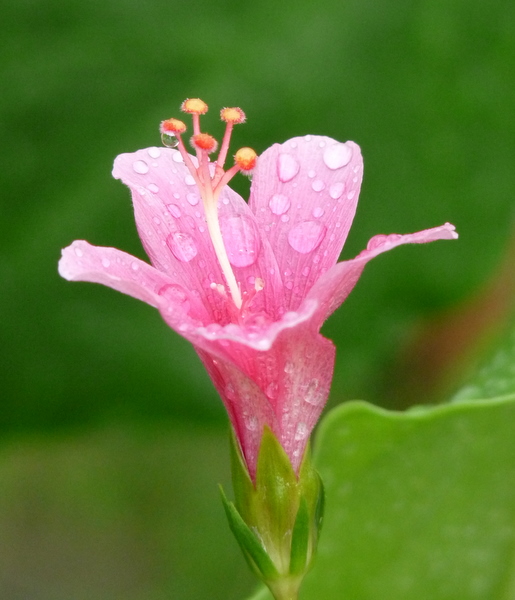
A lady who's age is CLEARLY more advanced than mine called out "uncle, uncle". I turned my head to look at her and before I had a chance to react and say anything, she pointed her fingers and said "I have a very beautiful pink hibiscus over there, you can take photo". I said thank you and commented that the flower is very beautiful indeed but I was pissed because she called me "uncle". I may have some gray hair but I'm not that old, OK! I guess it's time I change the route. Anyway, her flower is below:

Pink Hibiscus. 55.1mm (310mm), 1/80s, F3.7, ISO250. Cropped & tuned in Picasa.

Investigating Blurred/Bokeh Background.

To shoot a subject with a blurred background, it's important to understand what's Depth Of Field (DOF), so the title of this post might as well have been 'Investigating Depth Of Field'. The trick is to have small / shallow DOF, so that only your subject is sharp and in focus, while the background is out of focus and blurred.

79.4mm (447mm), F3.8, 1/100s, ISO400

According to the experts, generally, in order to have a shallow DOF, you would have to increase your aperture. The bigger your aperture, the smaller the DOF. Once you have a small DOF, you'll be able keep your subject sharp while the background is blurred.

With that, I zoomed out my FZ28 to as wide as possible, when only then it'll let me set it to the widest aperture possible at F2.8. So with such a setting I'll be able to shoot my blurred backgrounds, right? Well, as I found out, only occasionally, but not the rest of the time. Why is this? What did I do wrong?

To get the answers, I decided that it's time to have a long look at the mysteries of DOF for the FZ28. I started at DOFMaster.com, probably the only DOF calculator / site you'll ever need. Through their tables and equations page, I found out that you can actually calculate (pretty accurately) the near distance (listed as 'Near' in the illustration below) of acceptable sharpness and the far distance of the same. Once you have the near and the far, you can then get your DOF width. Armed with these information, you can then find out what settings will get you the smallest DOF.

It turns out that DOF is not just a function of the aperture alone, but is also a function of the focal length and subject distance. With focal length, the FZ28 starts at 4.8mm (27mm @ 35mm equivalent) and as you zoom, goes all the way out to 86.4mm (18x, 486mm @ 35mm). This means that the more zoom you have, the higher the focal length.

With subject distance, the closer a subject, the smaller the DOF (focal length & aperture remains constant). Because we are only interested in getting a small DOF, we shall only look at minimal subject distances. The FZ28, does impose minimal subject distance requirements, meaning the FZ28 is unable to focus on anything closer. If you zoom using the FZ28, you'll see the zoom magnification and minimum focus distance on the LCD, and these are the minimum subject distances we will be using. Bear in mind that if you press the macro mode button, the minimum focus/subject distance will change, but it'll not be covered for now.

Focal Length mm 4.8 9.6 14.4 19.2 24.0 28.8 33.6 38.4 43.2 48.0 52.8 57.6 62.4 67.2 72.0 76.8 81.6 86.4
35 mm 27 54 81 108 135 162 189 216 243 270 297 324 351 378 405 432 459 486
Zoom 1x 2x 3x 4x 5x 6x 7x 8x 9x 10x 11x 12x 13x 14x 15x 16x 17x 18x
Subject
Distance (m)
0.3 0.3 0.4 1.0 2.0 2.0 2.0 2.0 2.0 2.0 2.0 2.0 2.0 2.0 2.0 2.0 2.0 2.0
f
Stop
F2.8 0.11
F3.2 0.13 0.03
F3.4 0.14 0.03 0.03
F3.6 0.15 0.03 0.03 0.10 0.25
F3.7 0.15 0.04 0.03 0.10 0.25 0.18 0.13 0.10 0.08 0.06 0.05 0.04 0.04 0.03
F3.8 0.16 0.04 0.03 0.10 0.26 0.18 0.13 0.10 0.08 0.06 0.05 0.04 0.04 0.03 0.03 0.02
F4.0 0.16 0.04 0.03 0.11 0.28 0.19 0.14 0.11 0.08 0.07 0.06 0.05 0.04 0.03 0.03 0.03 0.02
F4.4 0.18 0.04 0.03 0.12 0.30 0.21 0.15 0.12 0.09 0.07 0.06 0.05 0.04 0.04 0.03 0.03 0.03 0.02
F5.6 0.25 0.05 0.04 0.15 0.39 0.27 0.20 0.15 0.12 0.09 0.08 0.07 0.06 0.05 0.04 0.04 0.03 0.03
F8.0 0.42 0.08 0.06 0.22 0.56 0.38 0.28 0.21 0.17 0.14 0.11 0.09 0.08 0.07 0.06 0.05 0.05 0.04
  • The black cells shows DOF (width).
  • FZ28 increases the minimum f stop you can use as you zoom in (e.g. at 86.4mm minimum f stop is F4.0)
Convert to inch

As can be seen from the table, the smallest DOF is not at max wide (4.8mm) and max aperture (F2.8), rather, if you zoom out slight at roughly 2x or 3x, you'll get much smaller DOF, with roughly the same subject distance and as wide an aperture as the FZ28 allows (F3.4).

You will also notice that the FZ28's minimum focus / subject distance goes in steps, 0.3-0.4 meters for 1-3x, then 1.0 meters for 4x, and after that 2.0 meters for everything else. In each step, the smallest DOF can be had when you have the largest zoom and therefore largest focal length. If you look at the values between 6x zoom and 14x zoom, at F3.7, the smallest DOF is at 14x zoom. In simple words, with all else being the same, a larger focal length (higher zoom) will give you a smaller DOF.

Also notice that a change in aperture actually brings only a small reduction in DOF, while a change in focal length will bring a large reduction in DOF. If you look at 4.8mm focal length column, changing from F3.8 to F3.2 causes a 0.03m (small) change in DOF. But if you zoom in to 9.6mm focal length (2x), you can have roughly 0.1m (large) change in DOF.

How to Shoot Blurred / Bokeh Background

  • Use aperture priority mode and set to as big an aperture as allowed by the camera. Big aperture means lowest f stop values, and remember the bigger the aperture, the smaller the DOF.
  • Place your subject as close to your camera as is focusable by your camera. The closer a subject is to your camera, the smaller the DOF.
  • Zoom in as much as possible to have the highest possible focal length. Remember that higher focal lengths results in smaller DOF.
  • If your subject is less than 2m away, your best bet is to place your subject at 0.3m to 0.4m away, zoom in at 2x or 3x, but not 4x, and then have as large an aperture as the camera allows.
  • If your subject is 2m or more, get your subject to as near to 2m as possible, zoom in as much as your composition allows with the biggest aperture.

Armed with these knowledge, I went out to see if my calculations and understanding can be translated into the real world:

Pic A: 4.8mm (27mm) 1x, F2.8 Pic B: 17.4mm (98mm) 3x, F3.6 Pic C: 86.4mm (486mm) 18x, F4.4

If you look at Pic A, blurring in the background is minimal and DOF is still rather wide. With Pic B, there is obvious blurring but it's not as nice as Pic C where the background blurring gives focus to your subject. All pictures were taken at minimum allowable distance, namely 0.3m, 0.3m and 2m respectively. All were cropped to get roughly the same view and auto focused. As you can see, the FZ28 works roughly as expected.

Bald Guy In My Dreams.

This bald guy here has been appearing in my dreams / nightmare. What does it mean?

Using Flash when it's not obvious.

I was in a restaurant when I shot the photo below. Notice that the background is too bright without details and I was not happy. What happens is that my FZ28 looks at the whole scene (meters) and decides that this is the best compromise. If it makes the background darker, then my cousin's faces will be too dark. If it makes my cousin's faces OK, then the background will be too bright, with the sun shining in. I guessed that the FZ28 simply does not have enough dynamic range to capture the scene naturally.

My cousins and hubby, without flash. (1/13s, F3.0, ISO200)

So what am I to do? I turned on the flash, or rather force it on, as shown below. Once I do that, the FZ28 looks at the scene again and decides to make the background darker, which would make faces dark too, but no worries, it'll just fire the flash to make them bright again. Just look at the beautiful green and colors at the background, which makes the photo much more pleasant overall.

My cousins and hubby, with flash. (1/30s, F3.0, ISO100)

Yes, I know the faces reflects some the the bright flash as it's direct flash from my FZ28, but still it's not too harsh. It would be even better if I had bounced the flash off the ceiling but alas, the FZ28 does not have a hot shoe, and therefore cannot use an external flash. For that I would have to buy an SLR which can do better in low light and use an external flash, maybe even a fast prime lens to go with that. Perhaps I shall take more lousy photos of my Mrs. as "prove" that I "NEED" an SLR, no?

Which SLR? 500D vs D5000 vs E620 vs GH1 vs K-x

The arrival of the Pentax K-x is really exciting news and if I'm going to get an SLR, which one will I get?

Canon EOS 500D Nikon D5000 Olympus E620 Panasonic GH1 Pentax K-x
Sensor Size 22.3 x 14.9 mm
3.32 cm²
23.6 x 15.8 mm
3.72 cm²
18.0 x 13.5 mm
2.43 cm²
18.0 x 13.5 mm
2.43 cm²
23.6 x 15.8 mm
3.72 cm²
Pixels 15.1 million 12.3 million 12.3 million 12.1 million 12.4 million
Pixel Density 4.5 MP/cm² 3.3 MP/cm² 5.1 MP/cm² 5 MP/cm² 3.3 MP/cm²
Pentax K-x has the best pixel density which translates to excellent image quality and great low light performance. The Nikon has the same low pixel density, but lose out on low light, based on reviews.
ISO 100-3200,
(6400-12800)
200-3200,
(6400)
100-3200

100-1600,
(3200)
200-6400,
(100-12800)
Pretty even for all cameras. If a camera lets you take ISO12800 photos, it does not mean that it's usable or clean (noiseless).
Image stabilization No No Yes, Sensor shift Yes, LensYes, Sensor shift
Canon and Nikon does not have image stabilization (IS) built into the camera, which means that you have to buy lenses that have IS, thus generally more expensive lenses.
Auto Focus 9-point
phase detect
11 point
phase detect
7-point
phase detect
Contrast
detect
11 point
phase detect
Min shutter 30 sec 30 sec 60 sec 60 sec 30 sec
Max shutter 1/4000 sec 1/4000 sec 1/4000 sec 1/4000 sec 1/6000 sec
Pentax K-x has an extremely fast shutter at 1/6000s meaning you'd probably be able to shoot fast actions.
Flash range 13 m 17 m 12 m 10.5 m 16 m
Exposure compensation ±2EV
0.3/0.5 steps
±5EV
0.3/0.5 steps
±5EV
0.3 steps
±3EV
0.3 steps
±3 EV
0.3/0.5 steps
Canon has only ±2EV compensation, not as good as the rest which has wider exposure compensation, especially useful when you want to capture multiple exposures for High Dynamic Range (HDR) photos.
Metering 35 Area Eval, Center-weighted, Partial, spot 3D Matrix meter II, Center-weighted, Spot ESP multi-pattern, Center-weighted, Spot Multi-segment, Center-weighted, Spot 16-segment Multi, Center-weighted, Spot
Continuous Drive 3.4 fps 4 fps 4 fps 3 or 2 fps 4.7 or 2 fps
Movie Clips 1920 x 1080 20fps
1280 x 720 30fps
640 x 480 30fps
1280 x 720 24fps
640 x 424 24fps
320 x 216 24fps
No 1920 x 1080 24fps
1280 x 720 60fps
848 x 480 30fps
640 x 480 30fps
320 x 240 30fps
1280 x 720 24fps
640 x 416 24fps
The inability of the Olympus E620 capture video is a deal killer. While Canon and Panasonic can produce full 1080 HD videos, the rest can capture 720 HD which is sufficient for me.
Uncompressed format RAW RAW RAW RAW RAW (PEF / DNG)
LCD 3 " 2.7 " 2.7 " 3 " 2.7 "
A larger LCD screen is always preferable, but 2.7" is not a deal breaker either.
LCD Resolution 920,000 230,000 230,000 460,000 230,000
Canon wins hands down with it's high resolution screen. Will it be enough to convince me to buy a Canon? We'll see.
LCD Type Fixed Tilt & Swivel Tilt & Swivel Tilt & Swivel Fixed
The ability to tilt and swivel your screen is definitely helpful, but bear in mind that these are SLR cameras, and except for the Panasonic GH1, live view is pretty slow, so you'll be looking through the viewfinder most of the time.
Live View Yes Yes Yes Yes Yes
HDMI Yes Yes No Yes No
Battery Lithium-Ion rechargeable Lithium-Ion rechargeable Lithium-Ion rechargeable Lithium-Ion rechargeable AA (4) batteries
There have been reports that the Pentax K-z are eating batteries for breakfast and sooner rather than later you're going to get rechargable batteries for it. Good Rechargable AA batteries don't come cheap, and it requires a good slow charger to maximize power and battery life.
Weight
(inc. batteries)
520 g 590 g 500 g 385 g 580 g
Dimensions 129 x 98 x 62 mm 127 x 104 x 80 mm 130 x 94 x 60 mm 124 x 90 x 45 mm 123 x 92 x 68 mm
The Pentax K-x have the smallest dimension and is my favourite.
Review Links Full Review Full Review Full Review Full Review Full Review

All of them are good cameras but how much do they sell for?

Canon EOS 500D Nikon D5000 Olympus E620 Panasonic GH1 Pentax K-x
Price Kit Lens $759.95
18-55mm F3.5-5.6
(29-88mm)
$649.99
18-55mm F3.5-5.6
(27-83mm)
$549.00
14-42mm F3.5-5.6
(28-84mm)
$1299.95
14-140mm F4-5.8
(28-280mm)
$549.95
18-55mm F3.5-5.6
(27-83mm)
The Olympus E620 is out of the question as it does not capture movies. The Panasonic is way too expensive for me. This leave me with the Canon, Nikon and Pentax. On paper, the Pentax wins in specifications and has received great reviews. It's the best performer in it's class at low light and still new (as of this writing), so the price is expected to drop further. If I were to consider nothing else, it'll be the camera I'll buy.
Twin Kit Lens $899.98
55-250mm F4-5.6
(29-400mm 13.8x)
$846.95
55-200mm F4-5.6
(27-300mm 11.1x)
$649.00
40-150mm F4-5.6
(28-300mm 10.7x)
$1299.95
14-140mm F4-5.8
(28-280mm 10x)
$749.00
55-300mm F4-5.8
(27-450mm 16.7x)
Because I own a Panasonic FZ28 now with it's 27-486mm (35mm) lens, I would definitely like to have more or less the same zoom when I get a SLR. Nowadays, many SLR kits comes with twin lens, but the Pentax K-x wins hands down with it's zoom (16.7x) and it's unbeatable price. Again, if I would consider nothing else, it'll be the camera I'll buy.
Prime Lens $479.95
Canon 28mm F1.8
(44.8mm)
$199.95
Nikon 35mm F1.8
(52.5mm)
$199.95
Zuiko 25mm F2.8
(50mm)
$399.00
Lumix 20mm F1.7
(40mm)
$439.00
Sigma 30mm F1.4
(45mm)
To get a feel of lenses that I may want to buy later on, I've also listed a fast prime lens that's good for portraits and indoor shooting. Here the Nikon wins hands down with it's low cost yet excellent quality prime lens.

If you're already a SLR owner, it make sense to buy a camera from the same manufacturer, so that you'll still be able to use your older lenses. But I don't, so I'm not tied to any manufacturer. For this reason, it makes sense for me to research a manufacturer more, so that once I'm tied to them, I will not regret getting tied.

The story with Pentax is that they are one of the world's largest optical companies, and made the first Japanese 35mm SLR. I'm guessing that when everyone switched from film to digital, like Konica-Minolta (bought over by Sony) it's facing great difficulties in competing because of it's inability to produce a digital sensor internally. All this is past, as Pentax has been working with Samsung from 2005 to recapture market ground from Nikon and Canon. As of March 2008, it merged into Hoya and is now a division of Hoya. (Full story at wikipedia).

The thing is, I don't want to be tied to a manufacturer and later on, wanting to buy extra lenses, find that they don't exist or are too expensive to afford. Therefore, I dig deep into eBay (where cheap lenses are to be had) to find out more about lens availability and pricing.

eBay Statistics Canon EOS 500D Nikon D5000 Olympus E620 Panasonic GH1 Pentax K-x
Lens available 5385 5349 1719 1272 2300
Avg. Price, Units
(last 30 days as
of 29 Dec 2009)
Fisheye $74.34, 1208 $90.85, 986 $80.56, 59 $56.51, 56 $173.49, 74
Macro $108.49, 1919 $98.41, 1368 $116.00, 157 $176.49, 29 $124.82, 255
Prime $172.87, 108 $146.83, 108 $158.40, 23 $849.00, 1 $74.70, 89
Telephoto $292.23, 1199 $156.52, 524 $79.28, 99 $56.15, 58 $200.23, 94
Wide Angle $152.69, 1357 $84.30, 882 $63.26, 134 $58.31, 131 $102.8, 114
Zoom $240.23, 2312 $307.11, 1607 $173.06, 223 $265.10, 45 $93.31, 359

Because Canon and Nikon are the top 2 camera brands worldwide, they have the most lenses on sale at eBay (5385 & 5349 respectively, they fluctuate but is accurate the the time of this writing). Please bear in mind that this is not an objective nor scientific study, I just clicked on the lenses category in eBay and filter for SLR lenses. Using other tools, I was able to obtain average prices and units sold for different lenses using keyword search (e.g. canon fisheye lens). The data is tabulated on the table as shown above.

Based on the specifications, reviews and prices, I was ready to purchase a Pentax K-x, but when I dig into eBay data, it's clear that Canon and Nikon has more lenses available, with Nikon generally more affordable. The thing is, Pentax may be cheaper initially, but if you're going to build up your lens collection, you're gonna have less choice and may end up with less money.

Now I'm just torn between the Pentax and the Nikon. Guessed I've narrowed it down and it'll have to boil down to how I feel when I hold the camera in my hands if I get a chance. Plus, there's the matter of getting a purchasing license from the Mrs., but that'll be another long post.

Why I dumped my Photo Manager for Picasa.

My sister got married recently and we shot an enormous amount of photos, not including 720p videos. Naturally some guest were requesting photos and it's impossible to send it to them without some sort of sorting and organization. And for this reason, I downloaded and installed Picasa.

1. Tag People Easily Through Face Detection & Recognition

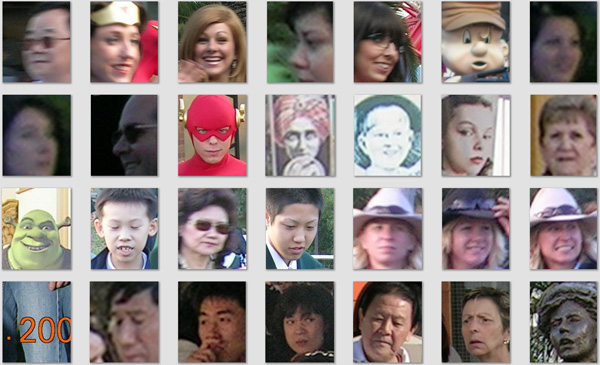
Once installed, Picasa will search your folders for images and try to detect faces in those photos, and boy, did it do this well. So well , in fact that it ask me to label faces below:

Bear in mind that Picasa only detects faces, it's up to you to identify them, or type in their name. Once you've told Picasa that the green guy is Shrek, it'll be able to recognize that most green guys are Shrek and suggest it to you, where you just click yes or no to identify the face without further typing. The software's also smart enough to group similar faces together, so that you get to identify a bunch of them in a single action. People's faces changes over time, and if you have old photos, all you gotta do is to identify one, and Picasa will recognize and suggest the rest.

For the ability to detect and recognize faces alone, Picasa is definitely worth the (free) download.

2. Organize Photos into Multiple Albums

I have always organized my photos into folders. I have a main folder (Lumix) and under it I have "Occasions" or "Flowers". I also have a folder called "Incoming" where I download all my photos from my camera before I process them a bit and sort them out into different folders. When I view them using my photo viewer or manager, I see my photos through my folder structure, illustrated below on the left.
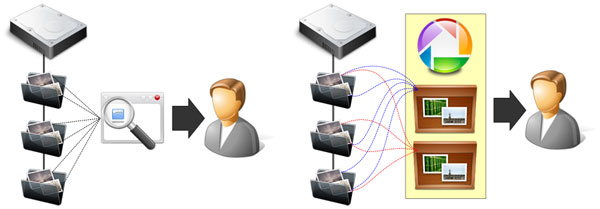
Left: Normal photo viewing through folder structure. Right: Viewing your photos through albums in Picasa.

On the right, you will see that Picasa allows you to view things differently through albums. For example, I have a photo of a flower (AusFlower.jpg) which I took in Australia and it resides in the folder "Flowers". If I create "Australia Album" and "Flowers Album", I can tell Picasa to put AusFlower.jpg in both albums, so that the same photo appears in both albums, despite the fact that only one copy of the photo exist physically on my "Flowers" folder.

While Picasa still allows you to view photos through the folder structure, albums lets you view and organize your photos with much greater flexibility. It also allows me to create 'temporary' albums, so that I could add in all the photos I wanted to send to a guest, zip them up and then delete the album, without physically deleting my photos on my hard drive. Now that's powerful.

3. Arrange and Sort Photos The Way I Wanted

The FZ28 always name our photos, PXXXXXXX.jpg. When you have a friend who uses a Canon send you photos, they are named IMG_XXXX.jpg. When you drop all these photos into a folder, all IMG_XXXX photos will be displayed before all your PXXXXXXX are displayed, because they are sorted alphabetically. For my sister's wedding, I wanted to preserve a timeline, meaning I wanted all photos that's taken at the same time to appear together (they have the same date), irrespective their file names.

Fortunately Picasa allows you to drag and drop photos to arrange them, without the need to modify or rename them physically on the hard drive. Picasa keeps tracks of how you wanted your photo arranged in a database, and everytime you fire up Picasa, they will be arranged as you have always wanted. Super!

4. Modify Photos without Actually Modifying Them

Sometimes I take a photo of a flower but it's obvious that some cropping will improve the photo. If I crop the photo, I will lose the original unless I save a copy of the original. With Picasa, all these is unneccassary as Picasa allows you to do virtual editing and cropping without actually modifying the photo on your hard drive.

Photo as it is captured by camera Same photo cropped in Picasa

Once you crop your photo, it will appear cropped in Picasa but the original photo on your hard drive remains untouched. You can undo your editing and cropping at any time in Picasa to go back to your original. Now this is how photo post production should be.

Photo as it is captured by camera Same photo with post processing

Other than cropping there are other effects in Picasa as shown above that you can play with, all of them undoable, meaning you can go back to your original at any time.

5. Search My Photos Easily

If you are not aware by now, Picasa is a free download from Google. And Google is famous for search. In Picasa, type in ".rw2" and picasa will show you all your photos on your hard drive with raw format. Type in a person's name and Picasa will show you all photos in which a person appears in. All these in almost real time speed. What's more to say?

Conclusion

In fact there a lots more features and benefits for Picasa, I just listed the "killer" features for me. I'm sold, you should give it a try.

The Color Yellow.

Sometimes I don't know why I like a particular shot. I can't explain it but the attraction is unmistakable.

Sometimes a simple flower by the road side teaches me about many things, surviving and thriving despite the conditions, how to frame shots, and how the FZ28 captures superb details.

Same flower shot, shown at about 33.3%.

Most of the times, I'm just amazed at the flower shots I get with my FZ28, especially the one showing as much details as below:

Same flower shot, shown at 100%.